


Payroll Management
The Payroll module handles pay calculation, overtime, shift differentials, margin analysis, and forecasting. Configure it once, then run payroll for each pay period.
Accessing Payroll
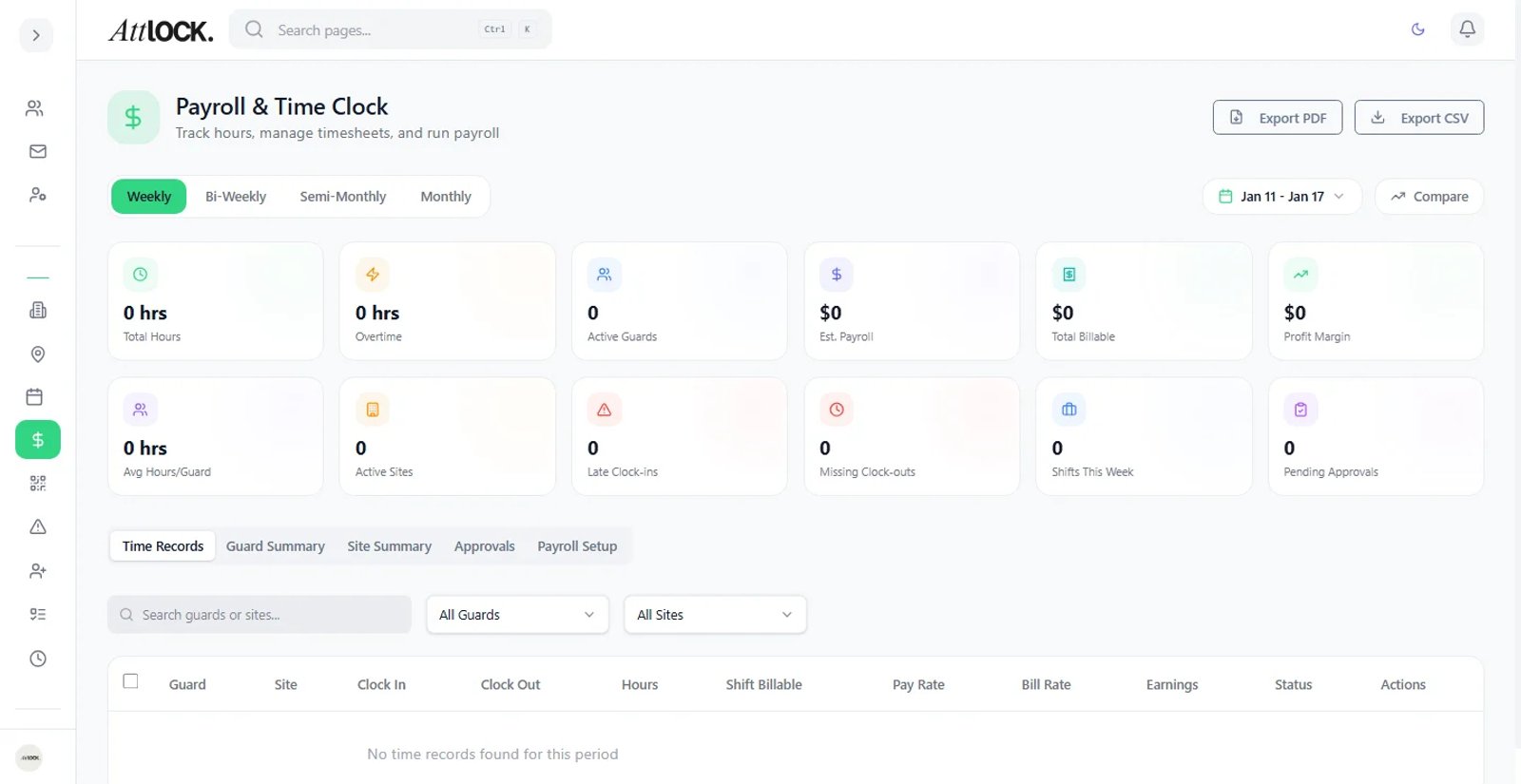
Navigate to Operations → Payroll in the sidebar. The section expands to:
- Payroll Dashboard — overview and KPIs
- Payruns — create and process pay periods
- Pay Rates — configure compensation rates
- Holidays — holiday calendar and premium pay
- Invoices — client billing
- Billing Contracts — service agreements
- Bill Items — billable service items
Dashboard KPIs
The payroll dashboard shows four key metrics for the selected period:
- Total Cost — what you owe guards.
- Total Hours — all hours worked.
- Billable Amount — what you charge clients.
- Margin % — profit margin ((billable − cost) / billable).
Select the pay period type: Weekly, Bi-Weekly, Semi-Monthly, or Monthly.
Setting Up Payroll (Setup Tab)
Before running your first payroll, configure the engine:
Pay Period
- Period Type: Weekly, Bi-Weekly, Semi-Monthly, Monthly.
- Start Day: which day the pay period starts.
Overtime Rules
- Weekly OT Threshold: hours before overtime kicks in (default: 40).
- Daily OT Threshold: hours before daily overtime (default: 8).
- OT Multiplier: typically 1.5×.
- Double-Time Multiplier: typically 2× (triggers after 12h daily or exceeding weekly threshold significantly).
Break Rules
- Auto-deduct breaks: deduct 30+ minute breaks on 6+ hour shifts.
Clock Tolerances
- Late clock-in tolerance: minutes before a clock-in counts as late.
- Early clock-in tolerance: minutes before shift start that a guard can clock in.
Shift Differentials
- Night Differential: percentage premium for hours between 22:00–06:00.
- Weekend Differential: percentage premium for Saturday/Sunday shifts.
- Holiday Differential: percentage premium for designated holidays.
Holidays
- Add specific dates to the holiday calendar.
- Holiday shifts automatically apply the holiday differential.
OT Forecast Warning
- Set the threshold at which overtime warnings trigger.
Creating a Pay Run
- Go to Payroll → Payruns.
- Click Create Pay Run.
- Select the date range.
- The system automatically calculates:
- Regular hours
- Overtime hours (1.5×)
- Double-time hours (2×)
- Shift differentials
- Break deductions
- Review the pay run summary — each guard's hours and total pay.
- Approve and Export when ready.
Margins Tab
Analyze profitability per guard:
| Column | Description | -------- | ------------- | Guard | Guard name | Hours | Total hours worked | Shifts | Number of shifts | Payroll Cost | What you pay the guard | Billable Amount | What you charge the client | Margin % | Profit margin per guard |
|---|
Red margins indicate unprofitable guards — review their rates or assignments.
OT Forecast Tab
Predict overtime before it happens:
- Hours Worked: current hours this period.
- Projected Hours: estimated total by period end.
- Threshold: overtime trigger point.
- Over By: how many hours over the threshold.
- Risk Level: Low, Watch, or High.
Use this to reassign guards before they hit costly overtime.
Breakdown Tab
Detailed cost analysis per guard:
- Regular, Overtime, and Double-time hours.
- Shift differential calculations (night, weekend, holiday).
- Break deductions.
- Total cost vs. billable amount.
Pay Rates
- Go to Payroll → Pay Rates.
- Set hourly rates for each guard or role.
- Configure overtime multipliers.
- Set rates by shift type if needed.
- View rate history.
Holidays
- Go to Payroll → Holidays.
- Add holiday dates.
- Set the pay rate multiplier for each holiday.
- Holiday shifts automatically apply the premium.
Invoices & Billing
Invoices
- Go to Payroll → Invoices.
- Create invoices from billable events.
- Track status: Draft, Sent, Paid, Overdue.
- Auto-email invoices to clients.
- Download invoice PDFs.
Billing Contracts
- Go to Payroll → Billing Contracts.
- Create service contracts with clients.
- Set terms, rates, and duration.
- Track contract status: Draft, Active, Expired, Cancelled.
Bill Items
- Go to Payroll → Bill Items.
- Configure billable service items:
- Hourly Guard
- Scheduled Patrol
- Dispatch
- Recurrent Fixed
- Set unit type (hourly, per item, flat rate) and price.
Tips
- Set up payroll rules before your first pay run — changing rules mid-period can cause inconsistencies.
- Check the OT Forecast weekly to avoid budget surprises.
- Review Margins monthly to ensure client billing covers guard costs.
- Use shift differentials to fairly compensate night and weekend guards.
Related Articles
- Scheduling Shifts
- Managing Guards
- Invoices & Billing
- Reports & Analytics